Savor - Recipe Declutter Cooking App
Category
UI/UX | 0-1 Design
/
/
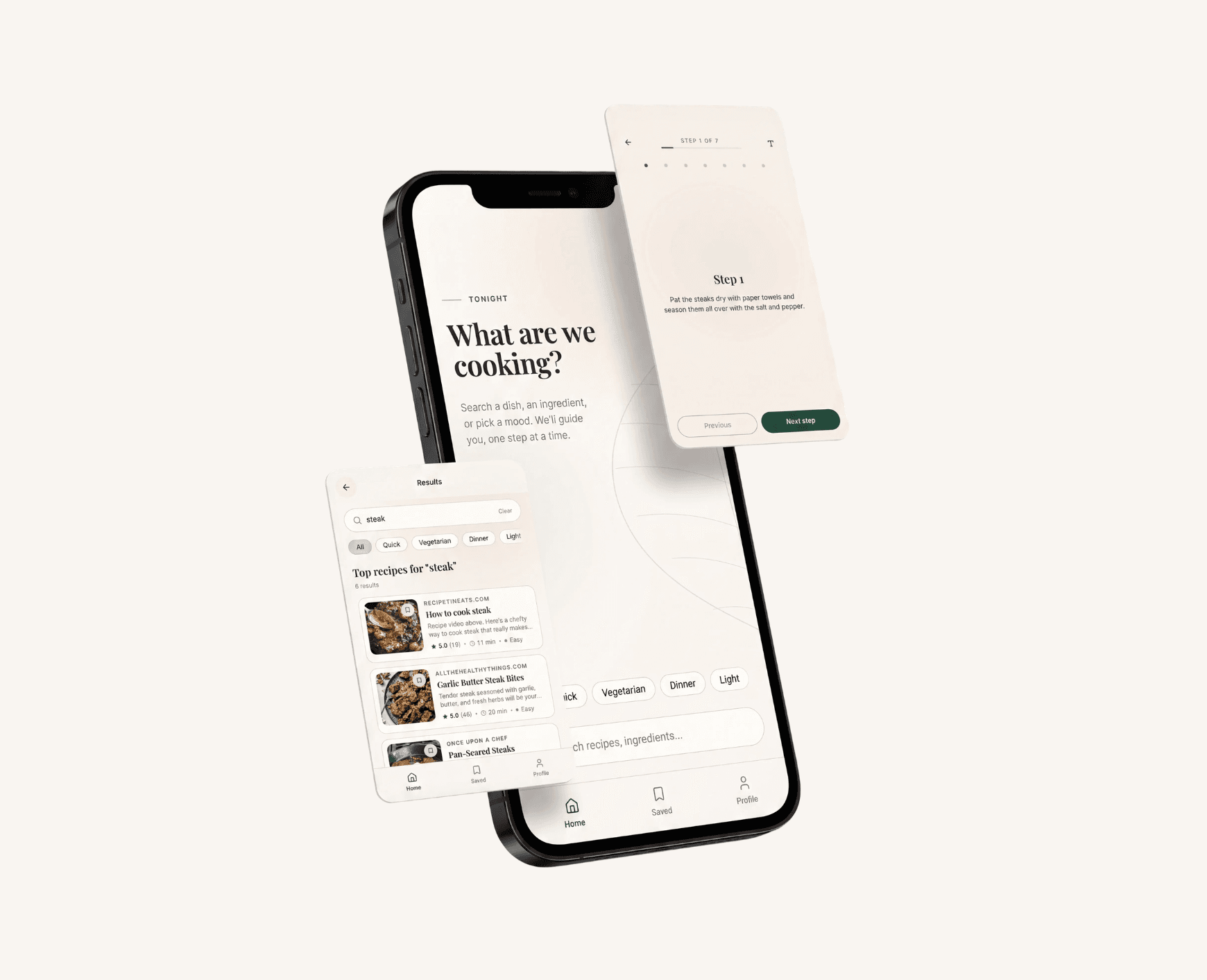
Savor is a calm cooking app that helps users find and follow recipes without the clutter and distraction of traditional recipe websites.
Less scrolling. More cooking.
Recipe websites can make a simple task feel fragmented: dismiss an ad, find the ingredients, scroll back to the next step. I designed Savor to bring that journey into one focused mobile experience, from finding a recipe to following it at the stove.
In six weeks, I took the concept from a 24-person survey through Figma prototypes to a working web app. The central design decision was to offer both a complete recipe overview and an optional, one-step-at-a-time Cook Mode.
Role · Solo UX/UI designer and prototype builder
Context · Student project · 6 weeks · 2026
Deliverables · Research, user flows, wireframes, visual system, Figma prototype, and AI-assisted functional build

01 · The challenge
A recipe should support the task happening off-screen.
Savor began with a calm-technology brief: design an experience that asks for less attention. I explored recipe guidance, focused news, and slower online shopping. The recipe concept resonated in class discussion and with my own experience of navigating cluttered pages while cooking.
The design challenge was broader than removing ads. A cook needs enough context to choose and prepare a dish, then a clear instruction when it is time to act. I wanted to understand where a quieter interface could help without hiding information people still needed.
02 · Research that changed the direction
Less clutter was a shared need. One-step guidance was a preference.
I created a 13-question survey and collected 24 responses about cooking habits, recipe sources, frustrations, and desired features. The results gave me an initial direction for the prototype:
19 of 24 (79%) selected ads and pop-ups as a frustration.
16 of 24 (67%) selected long stories before the recipe.
18 of 24 (75%) valued a distraction-free layout; 14 wanted guided steps and 13 wanted an ingredient checklist.
These questions allowed multiple selections. This was a small, exploratory survey of reported preferences, so I used it to prioritize the concept rather than establish how all home cooks behave.

The important tension: focus versus control.
My starting concept emphasized one step at a time. But only half of respondents preferred that format: 12 chose guided steps, 9 wanted all steps visible, and 3 said it depended on the recipe. Making Cook Mode the only way to read a recipe would have overlooked a substantial part of the group.
Design decision: keep a complete Steps view for scanning ahead, alongside an optional Cook Mode for following the current instruction. Calm meant letting people choose how much information they needed.
I also reviewed Paprika, SideChef, Just the Recipe, and Recipe Filter to compare approaches to organization, decluttering, and cooking guidance. That exercise helped define Savor's scope: connect web discovery, recipe preparation, and guided cooking in one mobile journey.
03 · Shaping the experience
Separate choosing a dish from making it.
I translated the research into a working persona, Priya, a busy graduate student seeking a manageable home-cooking routine. Priya was a design synthesis, not an interview participant. Her purpose was to keep the experience centered on a practical goal: prepare a meal without repeatedly searching the interface for what comes next.
The primary journey became Search → Results → Recipe detail → Cook Mode. Search and recipe tags support discovery; a shortlist supports comparison; ingredients and the full Steps view support preparation. Cook Mode narrows the interface to the current instruction, progress, and relevant controls.
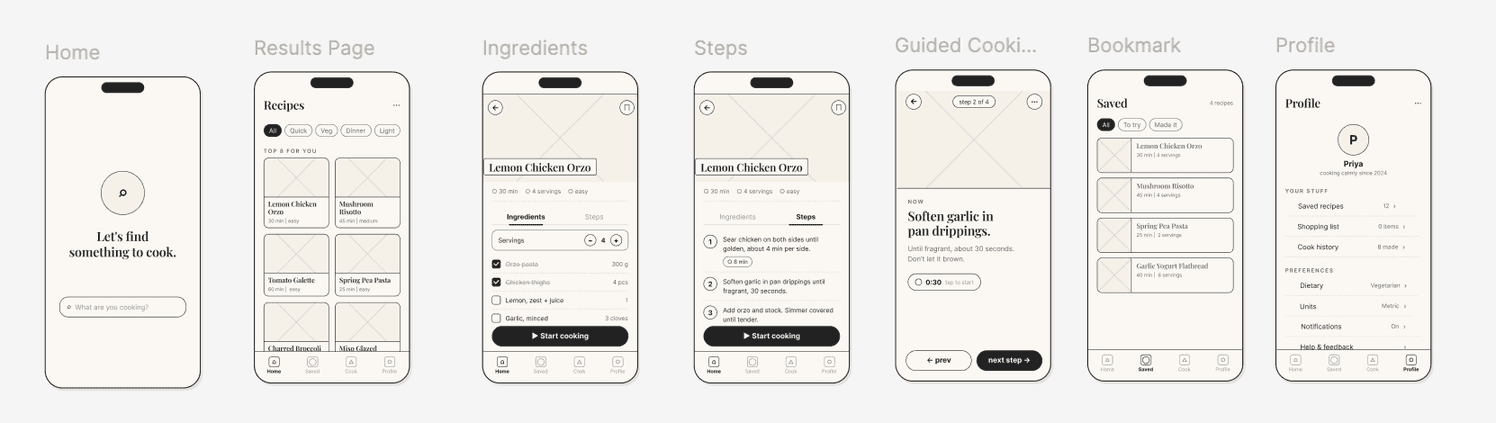
I mapped no-results, saved recipes, and completion paths alongside the main journey, then wireframed the core screens before developing the visual style. This helped me consider how people enter, leave, and return to the cooking flow.
Classmates reviewed the flow and wireframes. They found the sequence understandable and suggested onboarding support, step imagery, clearer comparison information, and profile customization. I treated these as design critique to investigate, rather than evidence of task success.
04 · Designing for the kitchen
A quiet interface still needs clear controls.
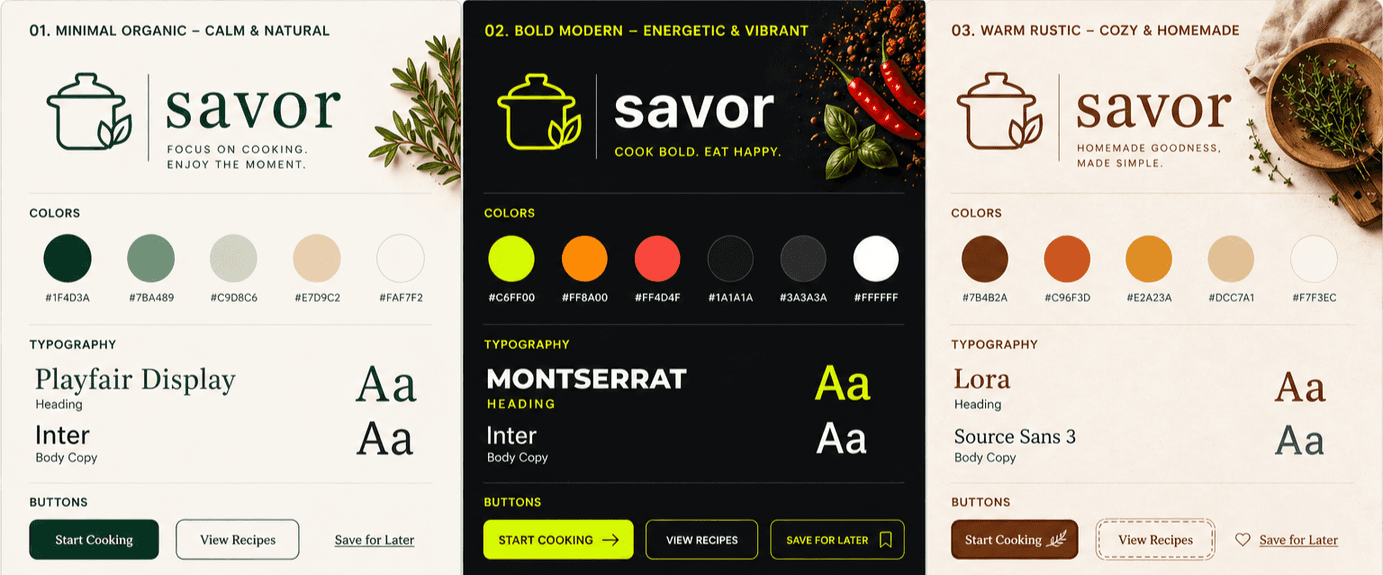
I explored minimal organic, bold modern, and warm rustic visual directions. I chose minimal organic because its warm neutrals and muted green supported the project's calm tone. Playfair Display gives recipe titles an editorial character, while Inter handles instructions and interface labels.
The visual hierarchy gives the recipe room to breathe while reserving stronger emphasis for actions and progress. The design specification also defines restrained slide and fade transitions and direct, unhurried copy. Those rules made calm a repeatable design choice across screens.
Cook Mode brought the tradeoffs into focus.
Across two high-fidelity critique rounds, peers asked for recipe reviews, more specific filters, and a timer that persisted between steps. My instructor also identified missing screens, while feedback exposed a broader accessibility gap: text scaling was available in Cook Mode but not throughout the app.
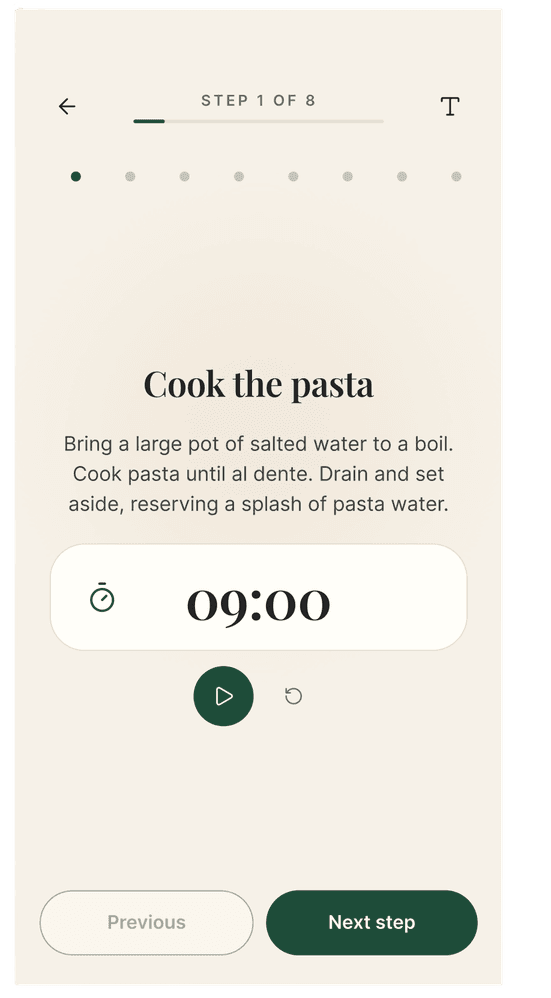
The documented Cook Mode refinements made its essential controls more explicit:
Adjustable instruction size gives the cook control over readability.
A larger timer and reset action make timing easier to locate and manage.
Visible step progress keeps the current instruction connected to the rest of the recipe.
These changes express the intended experience; their effect on cooking performance has not been measured. Persistent timers, broader text scaling, and the remaining critique points need further implementation checks and testing.
05 · Taking the design into a working product
The calm surface depended on a more complex system underneath.
I built a functional Next.js prototype with AI-assisted development. Before implementation, I documented the visual system, spacing, typography, motion, and components so that generated screens had a consistent design reference.
The prototype connects web search with recipe extraction. Brave Search supplies candidates; structured recipe data is extracted where available, with a Claude model used as a fallback. The results are normalized and ranked into a shortlist of up to eight recipes.
Connecting those layers was the hardest part of the build. It also revealed an important UX dependency: a clean layout is only useful if the ingredients, quantities, and instructions remain accurate. Building the flow made extraction reliability a concrete part of the next validation phase.
06 · Outcome and reflection
A working concept, with a clear next question.
In six weeks, I produced an end-to-end design and functional prototype spanning recipe discovery, preparation, and guided cooking. The work includes an exploratory survey, user flows, wireframes, a visual system, and iterations informed by peer and instructor critique.
I have not conducted formal usability testing or measured a reduction in scrolling, cooking time, or stress. The survey established interest and preferences; the prototype now makes those design assumptions possible to test.
What I would carry into the next project
Let research challenge the concept. The split between guided and overview preferences was more useful than general enthusiasm for a calmer app. It changed the structure of the experience and prevented me from treating my first idea as the only solution.
Make critique specific enough to act on. Positive reactions to the visual style did not resolve missing states, timer behavior, or text scaling. Those concrete gaps gave the next iteration a clearer purpose.
Build to reveal dependencies. Connecting search and extraction showed me how closely interface quality depends on content quality. Next time, I would evaluate difficult recipe sources earlier, alongside the screen designs.
Next: test attention, control, and trust.
I would observe cooks preparing a recipe on their own phones, comparing when they use the overview and guided modes. I would track lost-place moments, backtracking, requests for help, and readability problems, then compare extracted ingredients and instructions with the original sources. Those findings would guide priorities for screen-awake behavior, timer persistence, broader text scaling, and dietary information.

Thanks for reading.
Savor is live as a working prototype. Try it yourself ↗ (best viewed at phone width).

